




Budgeting apps are so rigid

Manage finances your way — without rigid budgeting rules.

Track wallets, accounts, and spending in one flexible app that adapts to how you actually handle money.

FreeBudget budget list home screen
  • Flexible wallet budgets with live running balances
  • Bank-style accounts with accurate balances
  • Wallet or Account budgets — start with whichever fits today
Sarah C.Marcus R.Priya P.Jordan B.David K.

1,800+ users and growing

Why FreeBudget

Organize your finances in a way that fits you.

Not every budget works the same way. FreeBudget gives you Wallet and Account budgets — two structures built for different habits, so you can set up money management around your life, not a rigid template.

Wallet budget

Flexible day-to-day tracking

Wallets are flexible running-balance budgets. Add income and expense lines whenever money moves — your balance updates as you go, without forced categories or month-end reconciliation.

How it's organized

  1. 1Create a Wallet budget
  2. 2Add wallet folders (optional groups)
  3. 3Log income & expense lines
  4. 4See live running balance

Dec 1, 2025

New work salary

USD3,000.00

December Salary

USD3,000

Dec 2, 2025

Weekly shop

USD2,500.00

Groceries

USD500

Dec 3, 2025

Morning run

USD2,494.00

Coffee

USD6
Income3,000.00
Expenses506.00
Paid500.00
Balance2,494.00

Built for

  • Day-to-day spending
  • Cash-style tracking
  • Shared pots & side projects
  • Running balance on every wallet
  • Folders to group related wallets
  • Add expense or income in a tap
Account budget

Like your bank accounts

Account budgets work the way people expect from a banking app. Each account keeps its own balance and transaction history, with portfolio views — structured so totals stay accurate over time.

How it's organized

  1. 1Create an Account budget
  2. 2Add financial accounts as tiles
  3. 3Log transactions with categories
  4. 4Review transactions & 30-day balance

Bank 1

USD3,489.00

Bank 2

USD10,250.00

Portfolio

USD13,739.00

Recent activity

View all

Bank 1

Income

Tue, Dec 23

+USD2,500.00

Bank 1

Rent

Mon, Dec 1

-USD1,200.00

Built for

  • Multiple bank accounts
  • Reconciling statements
  • Long-term accurate totals
  • Full transaction history per account
  • Portfolio chart across accounts
  • Recent activity in one overview

Together

One app for both budget types

Start with a Wallet for flexible day-to-day tracking, an Account for structured bank-style tracking, or both — then see everything together on the Budgets screen.

Budgets screen — both types together

Personal Wallet

Wallet

$1,250

Travel Wallet

Wallet

$800

Household Accounts

Account

$19,779

Emergency Fund

Account

$4,800

Wallet and Account budgets live on the same home screen — each labeled by type

Rigid budgeting apps

  • One rigid system for every kind of money
  • Envelope rules that ignore how you bank
  • Spreadsheets rebuilt at month-end
  • Separate apps for casual vs structured tracking

With FreeBudget

  • Wallet budgets with live running balances
  • Account budgets with full transaction history
  • Multiple budgets for different life areas
  • One home screen for wallets and accounts together

Platforms

Available on the platforms you use every day

Start on mobile today — manage wallets and accounts wherever you are, with your data synced when you open the app.

01

See all your budgets at a glance

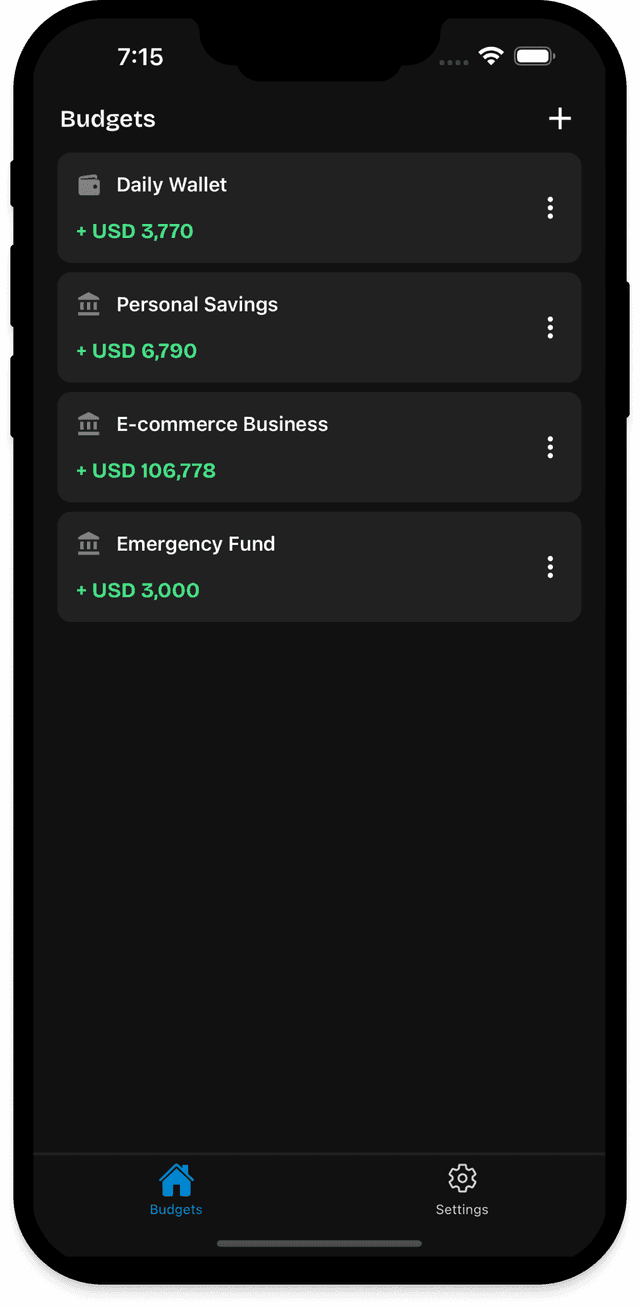
The Budgets tab lists every wallet and account budget in one place — with type, currency, and balance visible before you tap in.

  • Budget name with Wallet or Account type
  • Currency and formatted balance on each row
  • Create your first budget when the list is empty
FreeBudget Budgets home screen

Budgets

02

Organize spending with wallet folders

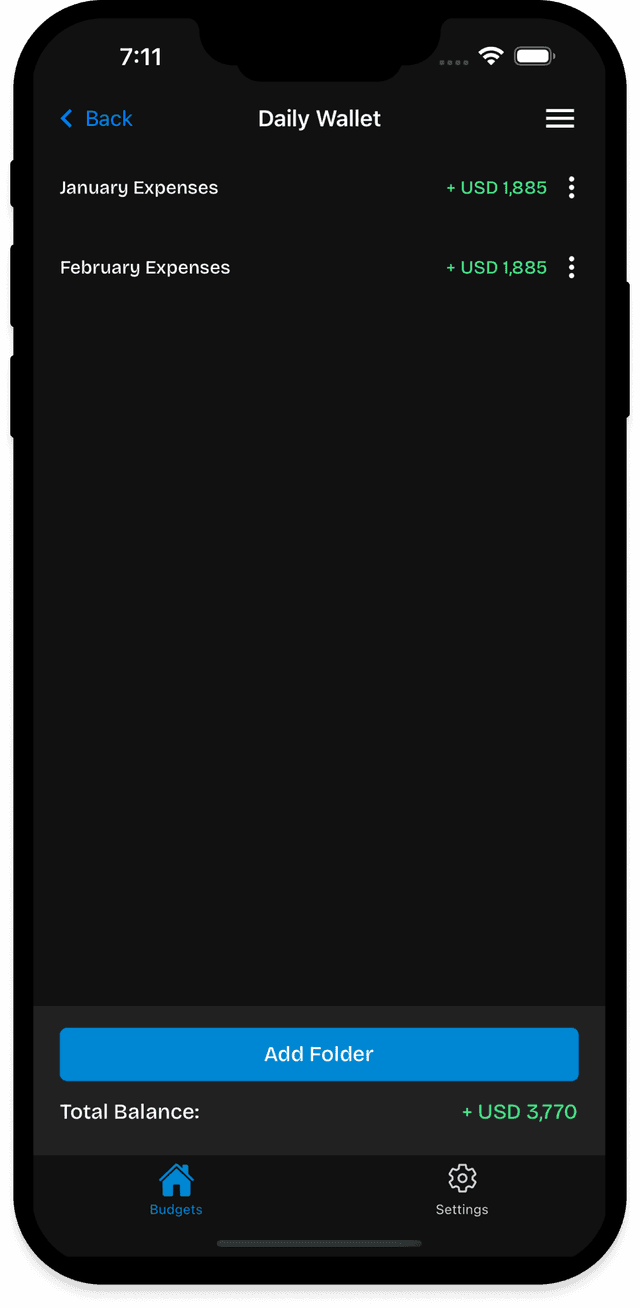
Inside a wallet budget, folders group related wallets together. Each folder shows its own balance, with a total amount summary at the bottom.

  • Folder list with per-wallet balances
  • TOTAL AMOUNT summary for the budget
  • Add wallet from the footer action
FreeBudget wallet folders screen

Wallet Folders

03

Track income and expenses as they happen

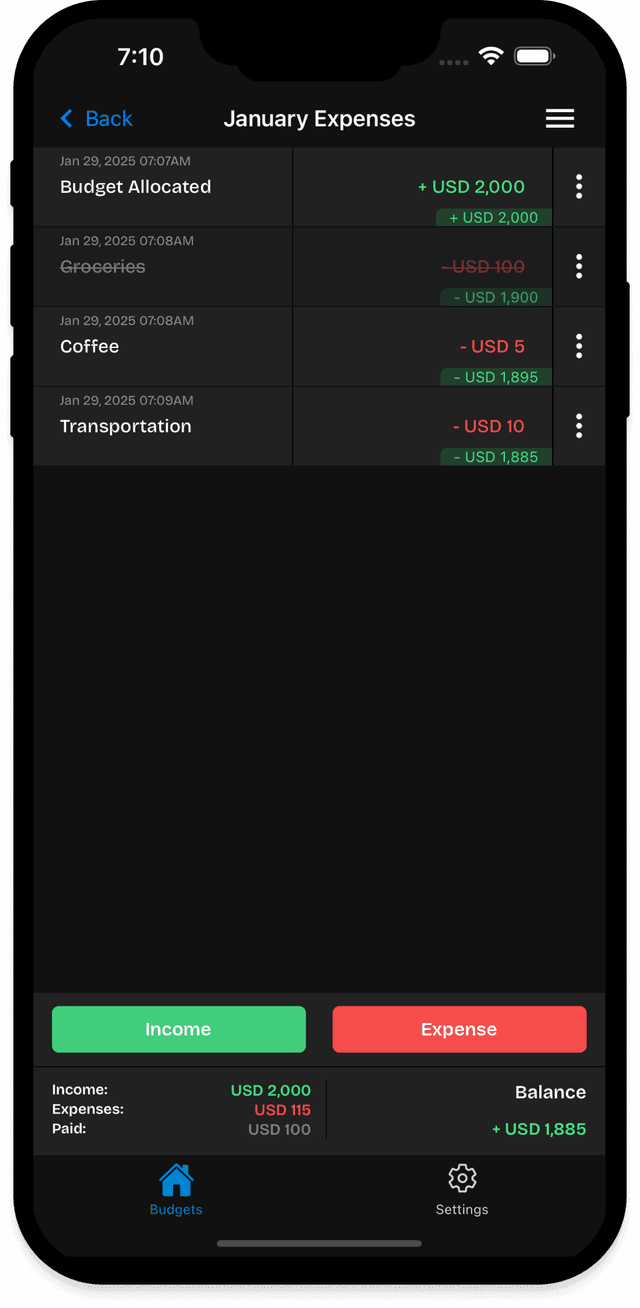
Wallet entries work like flexible lines on a running balance. Add income or expenses, mark items paid, and watch Income, Expenses, Paid, and Balance update live.

  • Add expense and Add income actions
  • Summary card: Income, Expenses, Paid, Balance
  • Running balance on every entry line

Finally a budgeting app that does not force me into categories I never use. Wallets just work the way I think about money.

Jordan B. · FreeBudget user
FreeBudget wallet entries screen

Wallet Entries

04

Accounts overview with portfolio at a glance

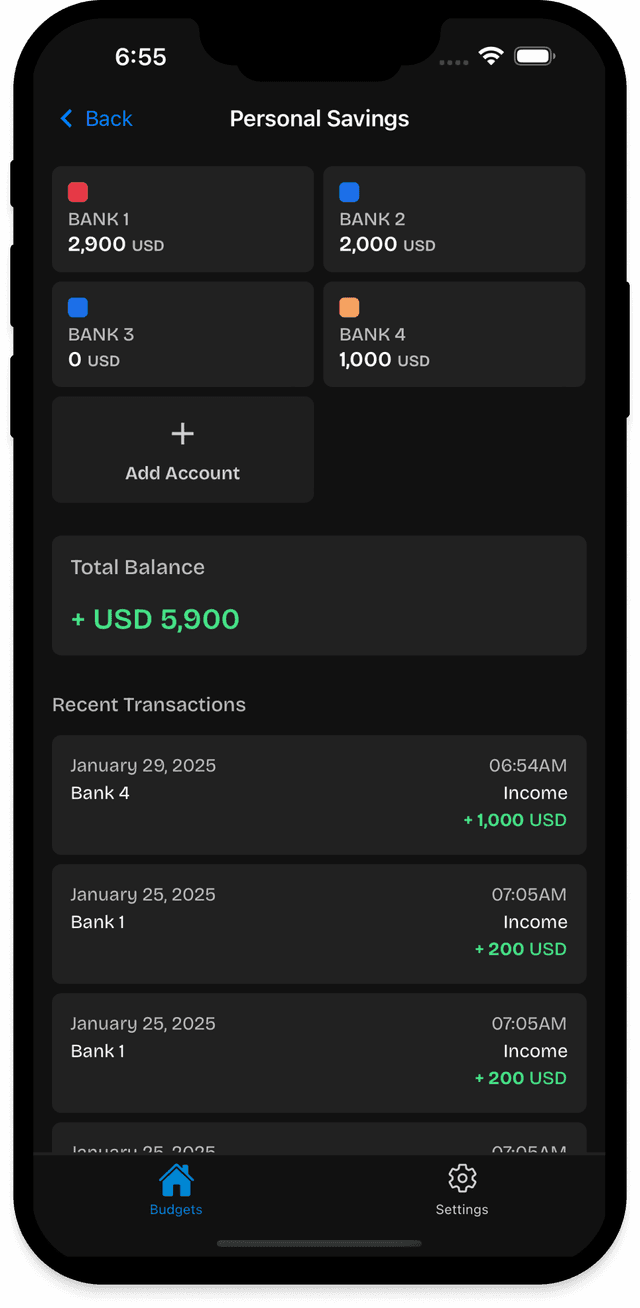
Account budgets show every financial account as a colored tile. Below the grid, Portfolio charts and Recent activity give you the bigger picture.

  • Account tiles with color, name, and balance
  • Portfolio chart across accounts
  • Recent activity feed on the same screen
FreeBudget financial accounts screen

Accounts

05

See every transaction in an account

Tap any account to open its details: last 30 days balance, progress chart, and a transactions list with View all for the complete history.

  • LAST 30 DAYS balance block with chart
  • TRANSACTIONS section with View all
  • Per-account history and running totals

It feels like the budgeting app I have always wanted — flexible wallets for daily stuff and proper accounts when I need structure.

David K. · FreeBudget user
FreeBudget account details screen

Account Details

Reviews

Trusted by people who want flexible budgeting

What users are saying about managing money their way.

Sarah C.

Sarah C.

Freelance designer

I tried envelope budgeting and hated it. FreeBudget lets me track cash-style wallets and proper accounts in the same app.

Marcus R.

Marcus R.

Small business owner

The wallet running balance is the first thing I check after spending. Simple, fast, and it actually fits how I manage money.

Priya P.

Priya P.

Personal finance enthusiast

Clean design, flexible structure, and it does exactly what it promises. Worth downloading even before you commit to a system.

Pricing

Unlock All Features

Gain unlimited access to all premium budgeting tools, analytics, and more.

  • Unlimited budgets and accounts
  • Custom categories and currencies
  • Advanced reports & analytics
  • Priority email support
7-day free trial

Yearly Plan

12 mo

Best value for daily budgeters. Effective monthly price shown in the app.

One-time purchase

Lifetime Plan

Lifetime

Pay once for ongoing Pro access — no recurring subscription.

Eligible new subscribers can start with a 7-day free trial on the Yearly Plan. Cancel anytime.

Prices are set in the App Store and Google Play. Open the app to see current rates in your region.

FAQ

Questions people ask before downloading

Who is FreeBudget for?

Anyone who wants flexible budgeting without rigid rules — whether you prefer casual wallet-style tracking, structured account tracking, or a mix of both.

What's the difference between wallets and accounts?

Wallets are flexible day-to-day budgets: add income and expense lines whenever you need, and keep a live running balance that updates as you go. Accounts work like your bank app — each keeps its own balance and transaction history, structured so totals stay accurate over time.

How does pricing work?

FreeBudget Pro unlocks unlimited budgets and accounts, custom categories and currencies, advanced reports and analytics, and priority email support. Choose the Yearly Plan or Lifetime Plan inside the app. Prices come from the App Store or Google Play in your region.

Is there a free trial?

Eligible new subscribers can start a 7-day free trial on the Yearly Plan when offered in the app. Trial availability is confirmed at checkout through RevenueCat — open FreeBudget to see whether you qualify.

Which platforms are supported?

FreeBudget is available on iOS and Android today. A web version is on the roadmap.

Does my data sync across devices?

Yes. Sign in with email and your budgets, wallets, accounts, and entries sync so you can pick up on any device.

Can I restore a purchase on a new phone?

Yes. Use Restore Purchases on the paywall screen in Settings to reconnect an existing Pro subscription on a new device.

Ready to manage money your way?

Download FreeBudget, set up your first wallet or account, and start tracking spending in minutes — without rigid rules or spreadsheet chaos.

Need help? Contact support